Magnetic Grip Ring Mount for iPhone 14–16 Pro Max
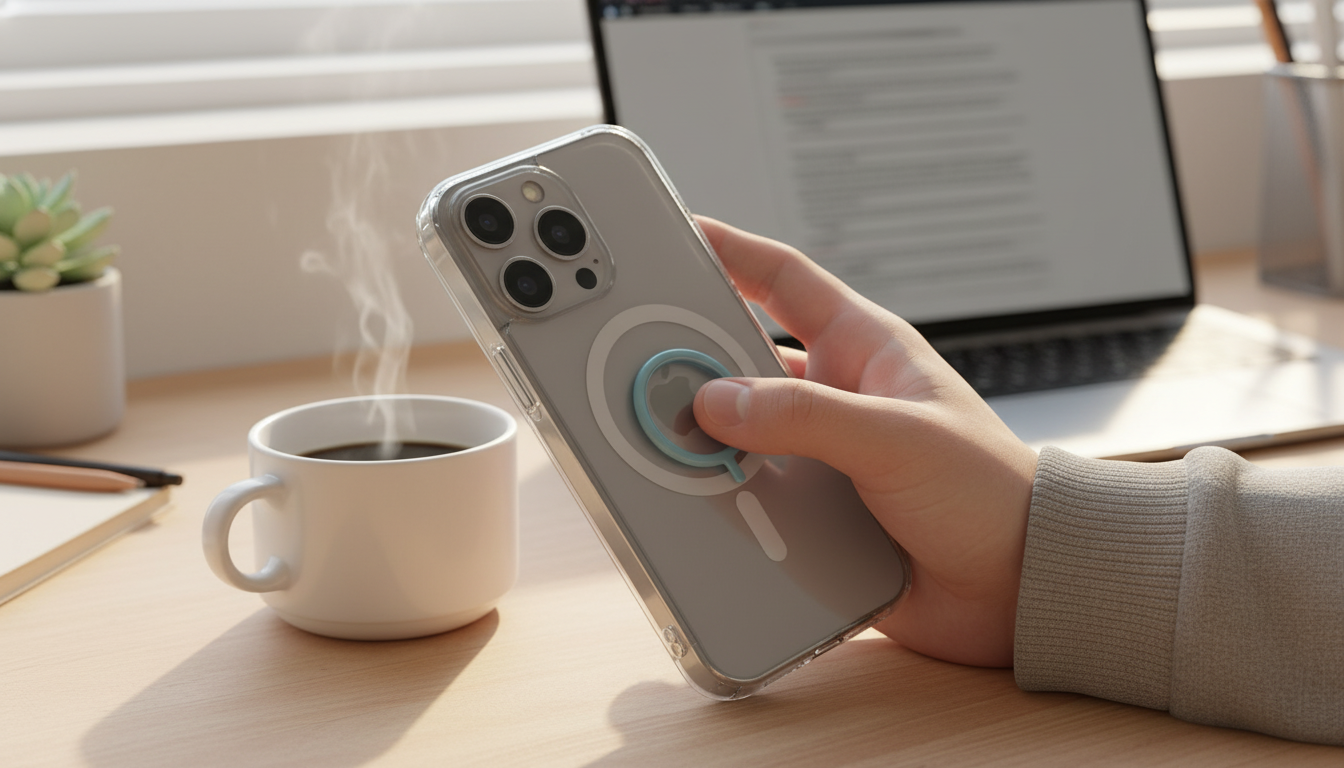
Magnetic Phone Mount with Grip and Ring Holder for iPhone 14, 15, 16 Pro Max
A magnetic mount that also works as a grip and ring holder can make a big phone feel more secure in-hand, easier to prop up for video calls, and quicker to attach to magnetic car or desk mounts. This guide breaks down how it works with iPhone Pro Max models, what to look for with cases, and how to get the most stable hold for commuting, workouts, and everyday use.
What This Accessory Does (Mount + Grip + Ring in One)
Pro Max iPhones have a lot of screen real estate, but the size can be awkward when you’re trying to do everything one-handed. A magnetic phone mount with an integrated grip and ring solves three daily pain points without adding multiple accessories.
- Magnetic attachment: it snaps onto compatible magnetic surfaces for fast docking and removal—no spring clamps, no squeezing, no alignment guesswork once you’re used to the “pull” point.
- Grip support: a centered hold point helps you relax your hand instead of pinching the phone at the edges, which can feel tiring on larger devices.
- Ring holder: the ring adds leverage for scrolling, selfies, and quick taps; it can also work as a simple stand for hands-free viewing.
- Everyday scenarios: car navigation, desk standby for notifications, kitchen video recipes, short-form filming, and video calls when you don’t want to hold the phone the whole time.
Compatibility With iPhone 14/15/16 Pro Max and MagSafe Cases
iPhone 14/15/16 Pro Max models support MagSafe-style magnetic alignment, which is the foundation for reliable “snap-on” accessories. If you’re using a case, the case is often the deciding factor for stability.
- Direct compatibility: these iPhone Pro Max models are designed to align with MagSafe-style magnetic accessories. For a plain-English overview of how the system works, Apple’s guide is a helpful reference: Apple Support: About MagSafe for iPhone.
- Case considerations: the most secure hold usually comes from a MagSafe-compatible case with a built-in magnet ring. Cases with weaker magnets (or thicker materials) can lead to twisting, slow sliding, or a “wobble” when you tap the screen.
- Camera and button clearance: on Pro Max frames, confirm the grip/ring sits where it won’t crowd the camera bump or make the side buttons harder to reach.
- Charging notes: if the accessory sits between your phone and a wireless charger, alignment and heat behavior can change. For consistent wireless charging performance, removing the accessory is often the cleanest approach; Apple also notes general wireless charging considerations here: Apple Support: About wireless charging on iPhone.
Quick Compatibility Checklist
| Item | Recommended | Why it matters |
|---|---|---|
| iPhone model | iPhone 14/15/16 Pro Max | Magnetic alignment support for accessories |
| Case type | MagSafe-compatible case | Stronger hold and less rotation |
| Magnetic mount surface | MagSafe car mount or magnetic plate | More secure docking while driving |
| Wireless charging | Remove accessory if needed | Prevents heat or alignment issues |
Grip and Ring Holder: Comfort, Stability, and Stand Angles
The ring/grip portion is what you feel all day, so comfort matters as much as magnetic strength.
- Comfort for larger phones: a stable grip point helps reduce “pinky shelf” strain from supporting the bottom edge of a heavier phone.
- Ring ergonomics: rotating the ring can improve reach for typing and scrolling. A snug hinge is a good sign—it tends to hold position better when you’re tapping or filming.
- Hands-free viewing: the ring can act as a kickstand in landscape for videos, recipes, or FaceTime. Some setups also work in portrait depending on hinge tension and where the ring sits.
- Safer handling: the added leverage can help prevent drops when taking photos one-handed or when stepping in and out of vehicles.
Using It in the Car: Keeping Navigation Stable
A magnetic mount is only as useful as it is steady. For driving, the goal is a secure hold that doesn’t bounce, rotate, or tempt you to adjust the phone mid-trip.
Safe driving comes first. If you need to change routes or settings, pull over; NHTSA’s guidance on distraction is worth reviewing: NHTSA: Distracted Driving.
Common Car-Mount Setups and Fit
| Setup | Best for | Watch out for |
|---|---|---|
| Dash/console magnetic mount | Steady viewing and easy reach | Adhesive placement and heat exposure |
| Vent magnetic mount | Convenient placement | Vent slat strength and airflow direction |
| Windshield magnetic mount | Higher eye-line | Potential glare and legal restrictions by region |
Day-to-Day Tips for a Strong Magnetic Hold
Care, Longevity, and Practical Limits
Product Snapshot: Magnetic Phone Mount with Grip and Ring Holder
Shop In-Stock Picks
- Magnetic Phone Mount with Grip and Ring Holder for iPhone 14, 15, 16 Pro Max — $7.67
- Feel Alive Again Checklist – Digital Download Self-Care Guide, Mindfulness eBook, Daily Wellness Routine — $5.99
At-a-Glance Details
| Detail | Value |
|---|---|
| Product | Magnetic Phone Mount with Grip and Ring Holder for iPhone 14, 15, 16 Pro Max |
| Price | 7.67 USD |
| Availability | In stock |
| Best use | Magnetic mounting + secure grip + ring stand |
FAQ
Will it work with a non‑MagSafe case on an iPhone Pro Max?
It may still attach, but hold strength and alignment depend on the case material and thickness. For the most stable connection (and less twisting), a MagSafe-compatible case with a magnet ring is typically the best choice.
Can it be used as a stand for watching videos or video calls?
Yes. The ring can act as a kickstand, and landscape orientation is usually the most stable. How steady it feels depends on hinge tension and the surface you set it on.
Does a magnetic grip interfere with wireless charging?
It can. Any accessory between the phone and the charger may affect alignment and heat, which can reduce charging consistency. If reliable wireless charging is a priority, removing the accessory during charging is often the simplest fix.















Leave a comment